
Remote tables are another component that permits you to characterize a table inside ServiceNow. It also helps to interface it to an outer information source.
ServiceNow gets its records from running a related content against the outside information source.
These records live in memory, which implies they are clean after you leave the rundown/structure.
Before we go in detail with the remote tables. Let’s start with :
Let’s try to see some usual challenges in data on Service-Now
Usually we create a table, use Business Rules or scheduled jobs to maintain this data.
This approach has one big con which is small changes require modifications on multiple configurations such as data for an additional column.
Creating a table use schedule jobs to maintain these data and purge them on a regular basis or requirement. Con on this method is inefficiency of data and API calls.
They are use to combine two tables and have limitations such as advance conditions, access on records and much more.
Remote tables are the right solution for use cases mentioned above.
Most important part is they support GlideRecord and ACLs like regular tables.
Simply the below “plugin” is require and it comes to activate from Orlando.
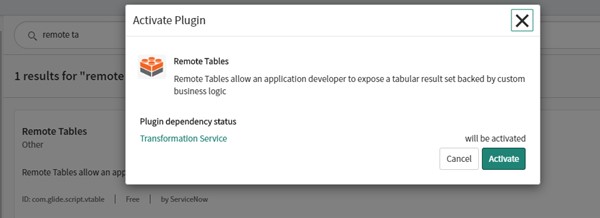
Remote Tables —-> Tables.
You might have observed that once you save the file. The record.Sys fields are missing??
For remote tables sys_id is the only sys field we have and it’s not auto populate.
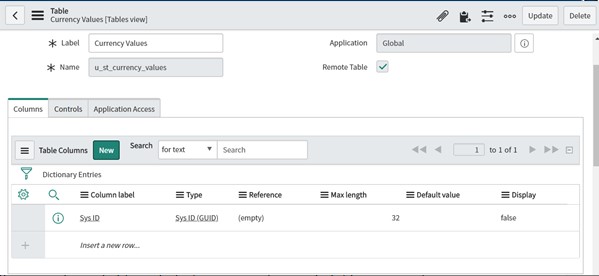
Let’s try to have a look at the definitions.
Here is an example.
Remote Tables — > Definition.
In this definition it tries to pull interaction records with details such as portal source, language, device and application.
Here it just pulls data only when queries through a script which we “get” from a GlideRecord.
Below is the sample definition create to show some data with a record that relates list of user groups and user.
v_table.addRow is use to create a record where object keys are field names and values are the values for records that will generate.
There is a catch here you cannot view this record as this data does not have any unique identifier. ServiceNow does not generate sys_id’s. You can provide unique identifiers (sys_id) of any value (not alphanumeric).
After modifying the definition with sys_id. You can even use sys_id of any existing data it should not lead to any database error as they are not store directly.
Remote tables require definitions to populate records. Definitions are scripts you can call an API or query tables to create JSON added as records.
v_query: API functions are as below:
v_query.getEncodedQuery() – returns encoded query string example as below.
v_query.getCondition(field) – returns encoded query string for the given field (includes field name, operator, and value)
v_query.getParameter(field) – returns parameter for the given field (only includes value for equality conditions)
v_query.isGet() – returns whether the query is a single get by sys_id
v_query.getSysId() – returns parameter for sys_id field
v_query.isTextSearch() – returns whether the query contains a text query parameter
v_query.getTextSearch() – returns text search query parameter (internal field name 123TEXTQUERY321)
v_query.getFirstRowWanted() – returns the first row to include
v_query.getLastRowWanted() – returns the last row to include


You went live on ServiceNow. Your team celebrated, your stakeholders…
Migrating from Microsoft Project Online to ServiceNow starts with one…
The shift in car buyer behavior has changed because information…