Changes are inevitable in IT operations. If any changes go wrong, who gets blamed? In most enterprises, fingers point at the team that implemented the change. What differentiates successful changes from drastic ones isn’t just luck; it’s the process.
You might think making changes isn’t that complicated and you can handle it alone for the team. However, the reality is whether it involves a software update, infrastructure shift, or strategic transformation; every change affects services, people, and productivity. Without clear accountability, proper risk analysis, or effective compliance tracking, even well-planned changes can lead to disruption or failure.
That is why enterprises seek an adaptive change management approach which evolves with them and blends with their modernization goals perfectly. So, what does this digital transformation require? Agility, speed, and control.
ServiceNow Change Management brings a solution for transitioning to new processes smoothly. It centralizes the entire change process, automates workflows, and provides real-time visibility into risk, impact, and approvals.
By 2027, 80% of companies said that they would accelerate the automation of processes. With automated workflows, rollback plans, and minimized risks, businesses can move faster and adapt more intelligently.
What is ServiceNow Change Management?
ServiceNow Change Management is a component of the ITSM (IT Service Management) module that governs how organizations plan, approve, and roll out changes to IT systems, reducing risk and downtime.
It prioritizes changes into different categories, based on the importance of each:
- Standard Changes: Follows procedure, has low risk, and is preauthorized.
- Emergency Changes: Includes changes that require immediate attention.
- Normal Changes: Changes requiring planning and approval.
Also referred to as IT Change Management, ServiceNow Change Management offers approval workflows, automated change processes, risk and impact analysis, a Channel Advisory Board (CAB), insights, and more.
Challenges Faced by Enterprises and How ServiceNow Change Management Solves Them
ServiceNow’s Change Management workflow solves the challenges your teams face constantly, making changes smart, automated and always ready with a backup. Let’s have a look at what it solves for your enterprise:
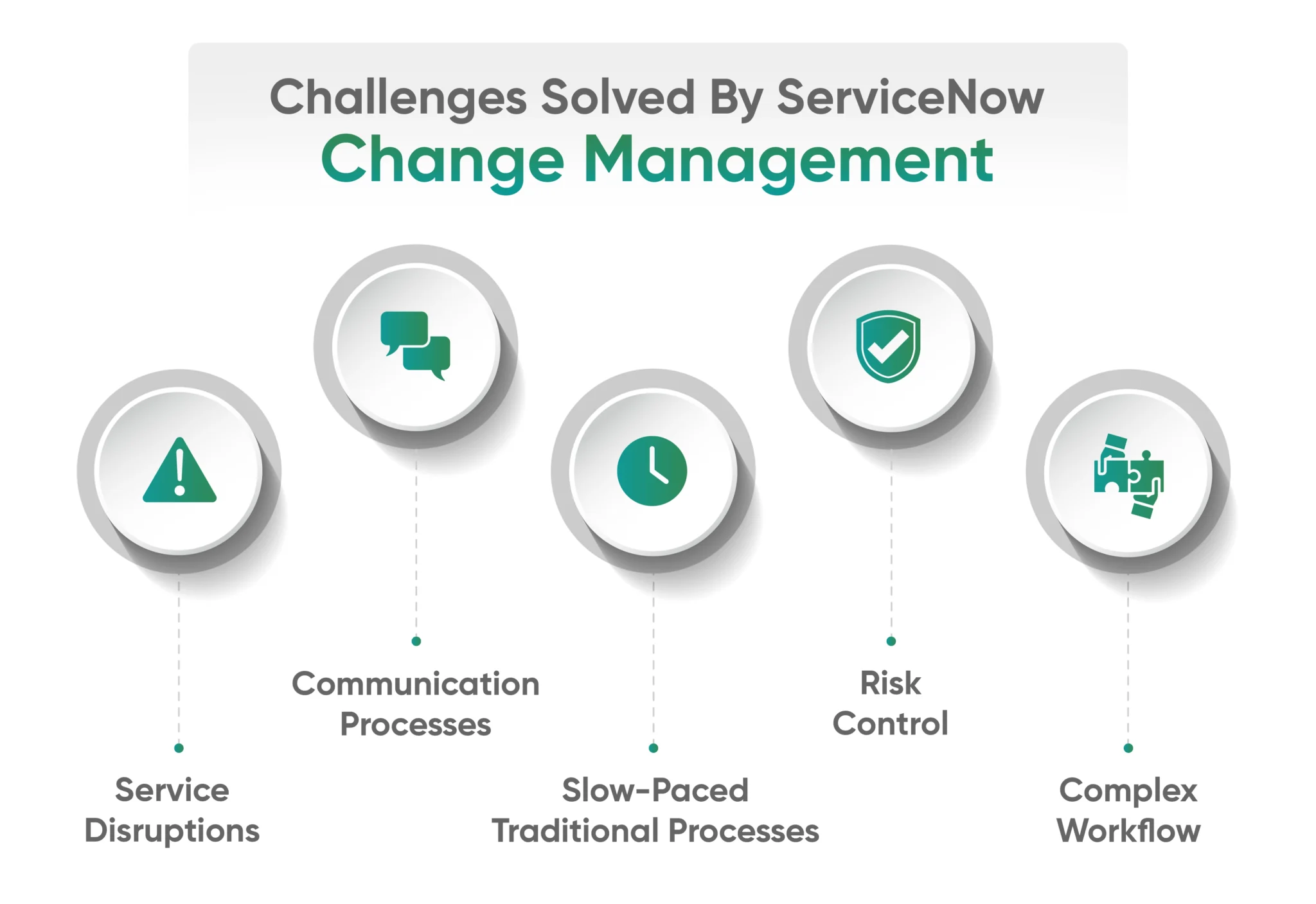
1. Slow-Paced Traditional Processes
Challenge:
Given the rapid technological changes, the traditional process of managing changes can make the workflow cumbersome. Manual reporting, insights, approvals, and follow-up can slow down the processes. Information changes often become trapped between systems and departments.
ServiceNow Change Management Solution:
ServiceNow offers automated workflows that keep up with technological changes. It reduces delays caused by manual approvals while providing actionable insights. It prevents changes from being trapped between systems and departments by consolidating all change-related data and processes in one place.
2. Service Disruptions
Challenge:
Poorly executed changes give rise to service disruptions. Unplanned service disruptions are also one of the most expensive challenges in change management. Service disruptions such as failed updates and application outages can be severe challenges for an enterprise.
ServiceNow Change Management Solution:
It automatically examines scheduled maintenance windows and changes timeframes to highlight overlaps before they cause issues. The CMDB creates a map of all IT assets and their relationships, enabling accurate assessment by showing which services and users might be impacted by the proposed change. The post-implementation review capabilities also reduce recurring disruptions by capturing the lessons learned.
3. Communication Processes
Challenge:
Disconnected communication channels lead to the loss of critical information among technical teams, business stakeholders, end-users, and IT personnel. Without a structured framework to address communication gaps, misalignments may arise.
ServiceNow Change Management Solution:
ServiceNow’s unified approach consolidates all change-related discussions, decisions, and approvals in one place. This creates an auditable trail accessible to all enterprise stakeholders. It automatically notifies relevant parties at each stage of the workflow, ensuring that everyone is informed about crucial information regarding the upcoming changes.
4. Risk Control
Challenge:
Businesses often face challenges in evaluating risk. Without a standardized method for assessing the risk of a change, evaluators may judge it differently. This creates inconsistency among teams and hampers innovation.
ServiceNow Change Management Solution:
It implements a comprehensive risk assessment framework that evaluates changes based on scope, impact, complexity, and resource requirements. It automatically calculates risk scores based on responses to standardized questions, ensuring a consistent evaluation process. ServiceNow enhances risk control through its CAB automation features, automatically routing high-risk changes to the appropriate CAB based on the risk score, affected systems, or business impact.
5. Complex Workflows
Challenge:
Even a single change may need the involvement of multiple teams, risk and impact analysis, and several approval steps. Without a centralized platform to manage changes, teams work in silos and face delayed approvals.
ServiceNow Change Management Solution:
ServiceNow automates workflows by assigning tasks to the right people at the right time and sending notifications. It offers a real-time dashboard for monitoring and enhancing performance and provides a unified platform where every step of the workflow can be tracked.
Features of ServiceNow Change Management
Risk control?
Check. Simple workflows?
Double check. Smarter changes? Absolutely.
Now let’s break down the core exclusive features of Change Management in ServiceNow:
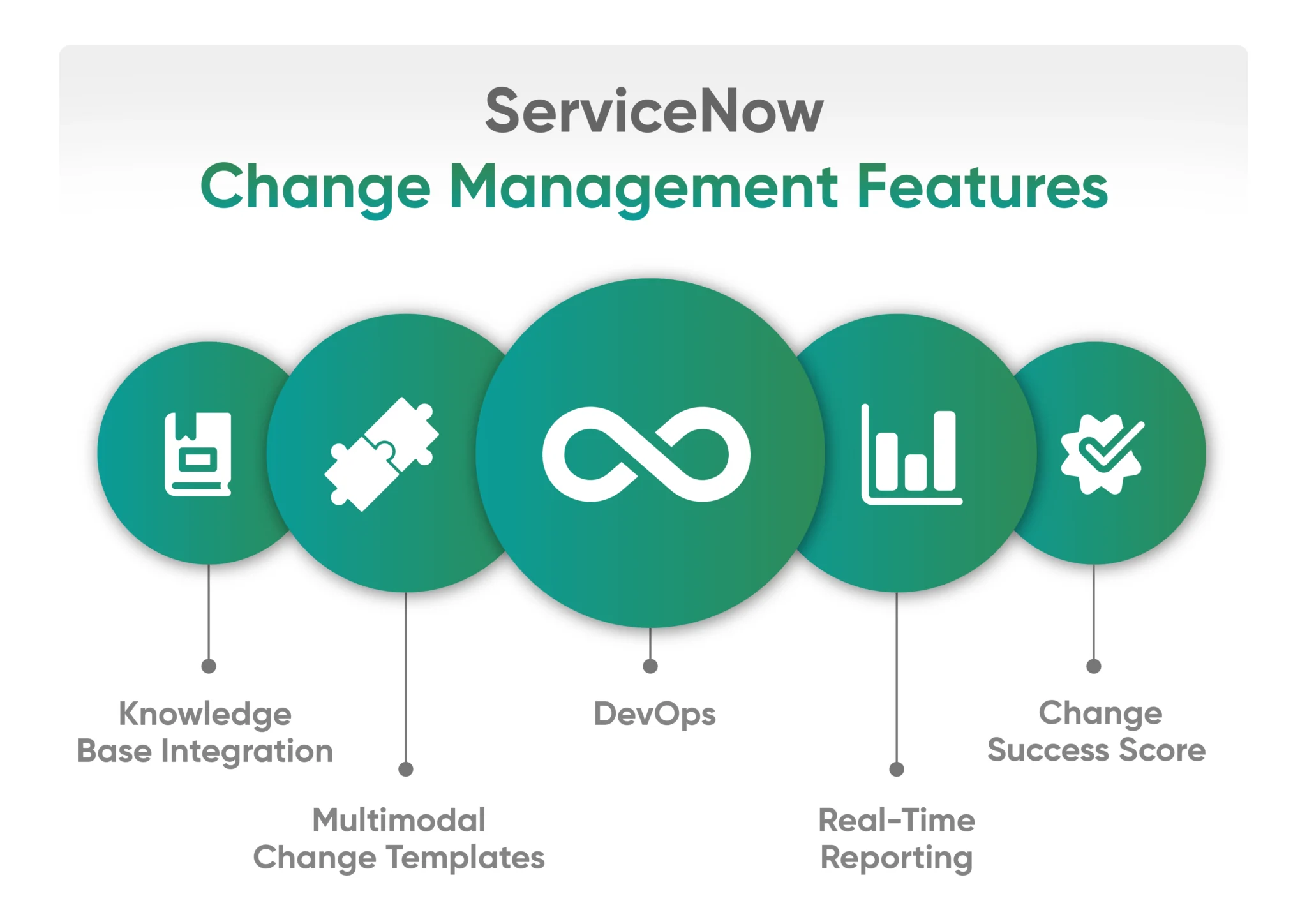
- Knowledge Base Integration: ServiceNow Change Management links change requests to the relevant articles, guides, and documents within ServiceNow’s Knowledge Base.
- Multimodal Change Templates: These templates enable you to customize the change process for various types of work, moving away from rigid templates and creating more flexible workflows.
- Real-Time Reporting and Custom Dashboards: You can get live visibility into change requests, status, approval cycles, and more. Custom dashboards can be created for various roles, including CAB members and change managers.
- Change Success Score: Change Management in ServiceNow assesses the effectiveness and reliability of changes. It scores changes based on factors such as impact, rollback frequency, and incident correlation.
- DevOps: ServiceNow integrates DevOps tools with ServiceNow Change Management, providing automated approvals, faster delivery, and enhanced visibility.
What AI-Powered Change Management Looks Like
Traditional change management still relies on people manually assessing risk, chasing approvals, and cross-checking calendars for conflicts. ServiceNow’s newer AI capabilities are changing that.
Instead of static risk matrices, ServiceNow now lets teams collaborate with AI agents that automate change workflows end-to-end, from drafting the change to routing it for approval. Risk scoring itself has gotten smarter too: the platform analyzes historical change patterns using machine learning to flag likely failure points before they happen, combining that with CMDB data and user input for a more complete picture of impact.
A few capabilities on the spotlight:
- Change Quality Agent: Automatically scores change records and persists that score with timestamps and contributing factors, so the data feeds directly into dashboards, audits, and future risk-detection models rather than living in someone’s memory.
- Conversational configuration: IT administrators can now set up change workflows through a natural-language, AI-native conversational agent, walking through approvals, risk scoring, and routing without needing to build it screen by screen.
- Collision and conflict detection: AI-assisted scheduling flags overlapping changes across teams before they collide, instead of surfacing the conflict after it’s already caused an outage.
The shift is from tracking changes to predicting how they’ll go. For CAB members, that means less time spent manually re-litigating routine approvals and more time on the handful of changes that genuinely carry risk.
Get Your Personalized Change Management Demo
How to Implement ServiceNow Change Management
Rolling out Change Management well is less about turning on a module and more about mapping it to how your teams really work. Here’s the typical path:
- Audit your current process: Document how changes are requested, approved, and tracked today, including the informal workarounds. This becomes your baseline for what to automate.
- Define your change categories and risk model: Decide what counts as standard, normal, and emergency for your organization, and set the risk criteria (impact, complexity, affected systems) that will drive automatic scoring.
- Connect your CMDB: Change risk assessment is only as good as your configuration data. Clean, accurate CMDB relationships are what let ServiceNow show real impact instead of guesses.
- Build your approval workflows and CAB structure: Configure who approves what, at what risk threshold, and set up notifications so nothing stalls waiting on a person who’s out of office.
- Pilot with one team or change type: Start with a lower-risk category, like standard changes for a single application team before rolling out CAB automation org-wide.
- Train your change managers and requesters: Even automated workflows need people who understand what the risk scores mean and when to override them.
- Monitor and refine using the Change Success Score. Use real outcomes to tune your risk model over time rather than treating the initial setup as final.
Most enterprises get functional Change Management running in a matter of weeks, the real timeline depends less on the platform and more on how ready your CMDB and approval structures are going in.
Bringing Change Management Closer to Your Business Needs with Aelum
Put simply, ServiceNow Change Management automates change processes, integrates with DevOps tools, and offers real-time risk insights, ensuring digital initiatives roll out quickly.
It establishes transparent processes, maintains open communication channels, and turns potential disruptions into opportunities for growth. With consistent workflows and complete visibility across systems, changes happen in a controlled and predictable manner.
As a certified ServiceNow partner, Aelum works with businesses to simplify their workflows, ensuring every change model and dashboard serves your goals. Want to modernize your change processes, connect with our ServiceNow experts and make change easier.