Remember Windows XP? Reliable, familiar, and so deeply embedded in enterprise DNA that IT teams built entire careers around it. But nostalgia doesn’t run a modern enterprise. Cloud infrastructure, security, user expectations, everything evolved. Windows 11 replaced it and redefined what an operating system was supposed to do.
Microsoft Project Online is having its XP moment.
Beloved by project managers and familiar to PMOs, now approaching end-of-life on September 30, 2026. The question is where you move, and whether you treat this as a forced migration or an opportunity. And most migrations take 3 to 6 months, so the timeline is tighter than it appears. To avoid operational disruption and data loss, decisions need to be made by early Q2 2026.
A platform worth consideration is ServiceNow Strategic Portfolio Management (SPM). Where Project Online managed projects, ServiceNow SPM embeds portfolio management directly into the same platform running your IT, HR, and finance operations. Demand is captured and prioritized against real capacity; investments are tracked against real outcomes, and you also get a live view of your portfolio.
In this blog, we compare the two to help you make a clear-eyed, practical decision about what your enterprise PPM should look like on the other side of September 2026.
Understanding the Two Platforms
Both solutions support enterprise PPM, but they’re built on fundamentally different approaches to managing projects, portfolios, and business outcomes. Let’s see how.
Microsoft Project Online is a cloud-based PPM solution enabling organizations to plan, prioritize, and manage projects and resources across the enterprise in a structured, PMO-driven environment. Its legacy architecture limits flexibility, innovation, and integration with modern systems. It lacks native AI-driven capabilities, and years without major feature investment are precisely what’s driving its retirement.
ServiceNow SPM, formerly ITBM, is a modern, workflow-native enterprise PPM solution that provides end-to-end visibility across portfolios on a unified, AI-enabled platform. It connects strategy with execution, enabling organizations to plan, deliver, and continuously track value. ServiceNow SPM was built for a different question entirely. Not “are our projects on track?” but “are our projects delivering the outcomes the business actually needs?
ServiceNow SPM provides a real-time view of how strategic objectives translate into execution and outcomes.
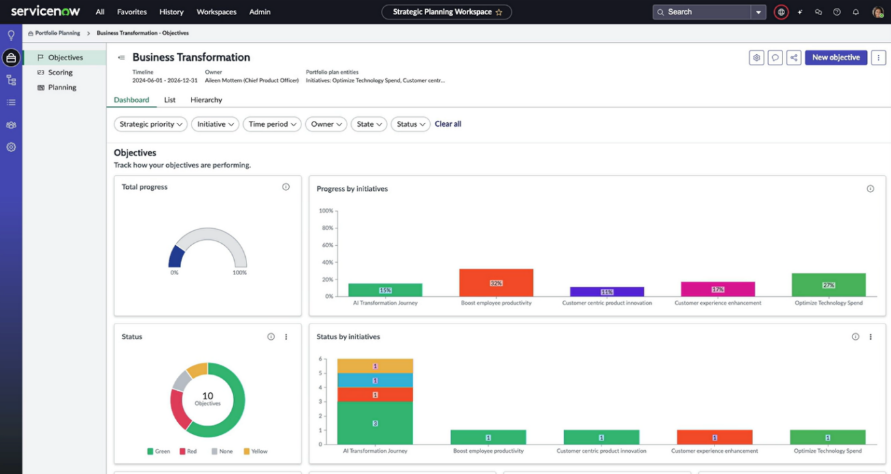
ServiceNow SPM dashboard showing business objectives, initiative progress, and status across strategic priorities.
Plan your Microsoft Project Online transition
ServiceNow SPM vs Microsoft Project Online
On paper, both platforms check similar boxes: project planning, resource management, portfolio visibility. But the moment you go one layer deeper, the architectural differences become visible. One is a project management tool that reports upward. The other is a strategic platform that looks across the entire enterprise.
The table below is where that difference becomes concrete.
| Dimension | Microsoft Project Online | ServiceNow SPM |
| Foundation | Standalone PPM tool built on SharePoint architecture | Workflow-native module on the unified Now Platform |
| Primary Design | Project execution and tracking | Strategy-to-execution alignment across the enterprise |
| EOL status | Retiring September 30, 2026 | Actively developed; regular release cadence |
| Project Planning & Scheduling | Gantt charts, task dependencies, milestones, baselines | Gantt, Kanban, list views; supports agile, waterfall & hybrid methodologies |
| AI & Automation | No native AI; in maintenance mode with no new AI investment | Now Assist for SPM, Predictive Intelligence, Process Mining, Virtual Agent; all natively embedded |
| Reporting & Analytics | Standard reports: burndowns, Gantt, cash flow, earned value; Power BI integration available | Performance Analytics with real-time dashboards, portfolio-level insights, and trend analysis |
| Risk Management | Basic risk tracking within projects | Structured risk identification, assessment, and mitigation across the portfolio |
| External Integration | Microsoft Teams, SharePoint integration | Integrates with MS Teams, AWS, Jira, Azure, Salesforce, SAP, and more. |
| Cross-Module Integration | Deep within Microsoft 365 (Teams, SharePoint, Power BI, Azure AD) | Broad enterprise integrations: ITSM, HRSD, Finance, DevOps, third-party tools via Integration Hub |
| ITSM / IT Operations Connection | No native connection | Same platform as ITSM. Incident, change, and project data share one data model |
| Workflow Automation | Limited; dependent on SharePoint 2013 workflows (retiring April 2026) | Extensive, low-code/no-code Flow Designer; approval chains, stage gates, automation built in |
| Mobile Access | Available via browser | Native mobile support via the Now Mobile app |
| Scalability | Adequate for mid-market | Built for enterprise scale, handles complex, multi-portfolio, multi-geography environments |
How Maruti Transformed Project Execution with ServiceNow SPM
Maurti Suzuki, India’s largest passenger vehicle manufacturers commanding over 40% domestic car market, transformed a manually governed, excel-dependent project environment with ServiceNow SPM.
Before ServiceNow SPM:
- Gantt exports unavailable; schedules couldn’t be downloaded into Excel
- Non-intuitive interface reduced usability and overall user adoption
- Limited workflow automation required manual follow-ups for approvals
- Integration with third-party systems was difficult
- Limited visibility into project delays and performance deviations
After ServiceNow SPM:
- Project schedules exported and imported via Excel with automated project creation & scheduled notifications
- Automated approval workflows route completed tasks directly to respective department heads
- Inter-project dependencies configured for better cross-project visibility.
- Custom slip-day calculation measures delays using planned vs actual dates, showing variance per task.
- Built-in baseline enables easy comparison between original plans and current progress.
- System handles 600+ sub-tasks within a single project without performance issues.
- Gantt charts can be exported as PDFs, and built-in status indicators show on-track/delayed tasks
See the detailed case study: How Maruti Suzuki Transformed Dealer Liability Reconciliation with ServiceNow
What Changes When You Move to Modern Enterprise PPM
Across enterprises that have transitioned from Microsoft Project Online to more modern platforms like ServiceNow SPM, a few consistent patterns emerge. This shift changes how portfolio decisions are made, executed, and measured.
1. Visibility Shifts from Projects to Outcomes
With Project Online, visibility typically stops at project status: timelines, milestones, and completion metrics.
With ServiceNow SPM:
- Whether investments are delivering expected business value
- How initiatives align with strategic priorities
- Where execution is drifting from intended outcomes
2. Planning Becomes Continuous
Traditional PPM environments rely on annual or quarterly planning cycles.
With ServiceNow SPM:
- Demand intake is ongoing
- Prioritization is dynamic
- Capacity is evaluated in real time
3. Resource Management Becomes Capacity-Driven
In Project Online, resource planning is often static, spreadsheet-dependent, and limited to project-level allocation.
With ServiceNow SPM:
- Capacity is mapped across portfolios
- Resource constraints are visible early
- Trade-offs are made proactively
4. Execution Connects with Operations
With Project Online, execution largely remains within the PMO layer, disconnected from day-to-day business operations.
With ServiceNow SPM:
- Projects are linked with IT, HR, and operational workflows
- Dependencies like incidents, changes, and requests are visible in context
- Execution aligns more closely with how the business actually runs
5. Real-Time And Predictive Reporting
Traditional PPM often have retrospective reporting, focused on what has already happened.
With ServiceNow SPM:
- Real-time dashboards provide up-to-date portfolio insights
- Predictive intelligence highlights risks and delays early
- Decision-making is faster and based on live data
These shifts are real, but they don’t happen on day one. SPM creates the conditions for them; realizing them takes deliberate configuration, change management, and organizational adoption. The organizations that see the most value from this transition are the ones that approached it as a process change.
Also Read: Step-by-Step Migration from Microsoft Project Online to ServiceNow SPM
Your Next PPM Platform Is a Decision. Aelum Makes It a Confident One.
September 30, 2026, is a fixed date. What happens after it isn’t.
For businesses treating this as a forced migration, the outcome is predictable. A new tool doing the same old job. But for those taking this as a strategic reset, it’s an opportunity to close the gap between what the PMO manages and what the business actually needs.
At Aelum, we’ve worked with enterprises to navigate similar transitions by starting with the right question: what does your PPM environment actually need to do, and is your next platform built to do it? From readiness assessment to full ServiceNow SPM implementation, we make sure the platform you land on is built for where your business is going.
If you’re at the point of seriously evaluating your options, the most valuable next step is an honest conversation about where your current PPM environment is falling short.
That’s where we start. Talk to our migration experts today.