Your ServiceNow portal is live, integrated, and running exactly as designed. So why are employees still emailing IT?
The reality most dashboards won’t show you: users rarely complain about a confusing portal. They simply stop using it. They raise a ticket instead of browsing the catalog, ask a colleague instead of searching, or abandon a form halfway through. None of that trips an alert. All of it can show up six months later as flat adoption numbers, with no obvious cause.
A ServiceNow Portal UX Audit helps close that gap between “the portal works” and “the portal works for the people using it.”
What is ServiceNow Portal UX Audit?
A ServiceNow Portal UX Audit is a structured evaluation of how effectively your portal supports users, from finding the right service and navigating the experience to completing tasks with minimal friction.
ServiceNow Usage Insights adds the behavioral layer, revealing usage patterns, drop-offs, and usability challenges that can affect portal adoption. This can be paired with ServiceNow’s UX: Portal Experience Review, which evaluates Employee Center against usability, design, and ServiceNow leading practices. Together, these perspectives provide a more complete view of the portal experience, combining what users are doing with how effectively the experience is designed.
That makes a ServiceNow UX assessment more than a design check. It turns user signals into actionable insight, revealing what is getting in the way and where targeted improvements can deliver the greatest impact.
So, what does a struggling portal actually look like, day to day? The pain points often show up in a few telltale patterns.
5 Signs of UX Gaps in Your ServiceNow Portal and What a UX Audit Reveals
A UX audit connects the everyday friction employees feel to the exact page, process, or gap causing it. Here’s where that friction usually shows up, and what the audit does about each one.
1. Slow Portal Load Times:
A few extra seconds is often all it takes for someone to give up on self-service and raise a ticket instead. The audit uses ServiceNow Usage Insights to break load time down into server, browser, and network time, pinpointing exactly where performance is costing you.
2. Excessive Click Paths:
If a routine request takes ten steps instead of three, most people will find a shortcut around the portal, not through it. The audit maps navigation paths, menu structure, and task flows against how ServiceNow expects these elements to function, to see where journeys can be shortened.
3. Content Structure & Search Experience:
When employees can’t find what they need through browsing or search, they often turn to IT instead. The audit reviews how ServiceNow’s Unified Taxonomy organizes requests, articles, and quick links, and whether search makes those resources easy to find.
4. High Journey Abandonment:
High traffic can hide a portal that’s failing. The audit uses Usage Insights conversion funnels to show exactly where users drop off across specific journeys, and whether the ones you’ve designed are actually working end to end.
5. Visual Design & Accessibility Gaps:
Inconsistent layouts, visual hierarchy, or interaction patterns can make the portal harder to navigate and use. The audit reviews consistency, clarity, responsiveness, and accessibility against ServiceNow’s Portal Experience Review standards for Employee Center.
The Value Add
Looking for practical ways to improve portal usability and adoption? Start with our ServiceNow Portal Design Best Practices.
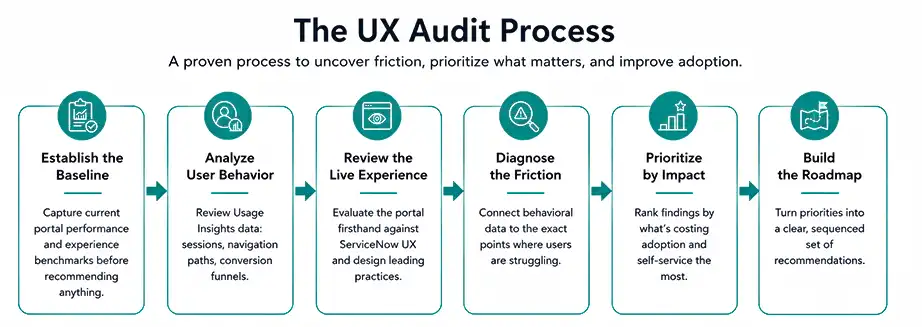
How to Conduct a Portal UX Audit
A portal UX audit follows a structured process that moves from understanding the current experience to identifying gaps and prioritizing improvements. Here’s how each stage turns user behavior and UX insights into a clear action plan.
Your ServiceNow portal might be showing red flags. Are you seeing them?
Why Portal UX Matters to the Business
Portal UX is more than a design concern. When employees can find services faster, complete tasks with less effort, and navigate the portal intuitively, the experience starts contributing directly to how efficiently the organization operates.
- Adoption: Adoption goes beyond portal visits. It grows when employees find the experience useful and return to it regularly. A clear, intuitive experience can turn occasional users into repeat self-service users, helping organizations get more value from the digital channels they’ve already invested in.
- Self-Service Effectiveness: Self-service creates value when it reduces dependency on support teams, not simply when services are available online. A well-designed portal can help employees resolve routine needs independently, while allowing service teams to focus their time on more complex requests.
- Employee Experience: The portal is often where employees experience the organization’s digital services firsthand. A smoother experience reduces the effort employees spend figuring out where to go, what to select, or what to do next, making everyday interactions feel simpler and more consistent.
- ServiceNow Investment Value: A ServiceNow implementation delivers value beyond the technology itself. The real return comes from how effectively employees use the services, workflows, and capabilities built on the platform. Better UX helps turn that investment into measurable usage, stronger self-service, and greater operational value.
Give Your ServiceNow Portal a UX Reality Check with Aelum Design Studio
Your next ServiceNow improvement could be hiding in the experience itself. Let’s find it, prioritize it, and make the portal work harder for your users.
Talk to Our Experts: Get an expert perspective on the UX gaps, usage patterns, and journey challenges shaping how employees interact with your ServiceNow portal.
Explore Aelum Design Studio: See how Aelum Design Studio brings UX strategy and ServiceNow expertise together to create experiences that feel intuitive from the first click to the final task.