Migrating from Microsoft Project Online to ServiceNow starts with one critical priority: executing the transition without disrupting ongoing operations.
While the decision to move is already made, the real challenge lies in ensuring continuity: protecting data integrity, maintaining workflow stability, and avoiding operational disruption. Without a structured approach, migrations can quickly introduce risk, complexity, and delays.
What’s needed is a clear, phased pathway that prioritizes what matters, reduces uncertainty, and enables a controlled transition at scale.
Here’s a practical, step-by-step approach to help you migrate with confidence, without compromising ongoing operations.
“Still evaluating your options? Explore our Microsoft Project Online alternatives guide before planning your migration”
A Structured Migration Path from Microsoft Project Online to ServiceNow SPM
A structured, phased approach ensures migration is controlled, low-risk, and aligned with business continuity. While timelines vary based on complexity, most enterprise migrations follow a similar progression:
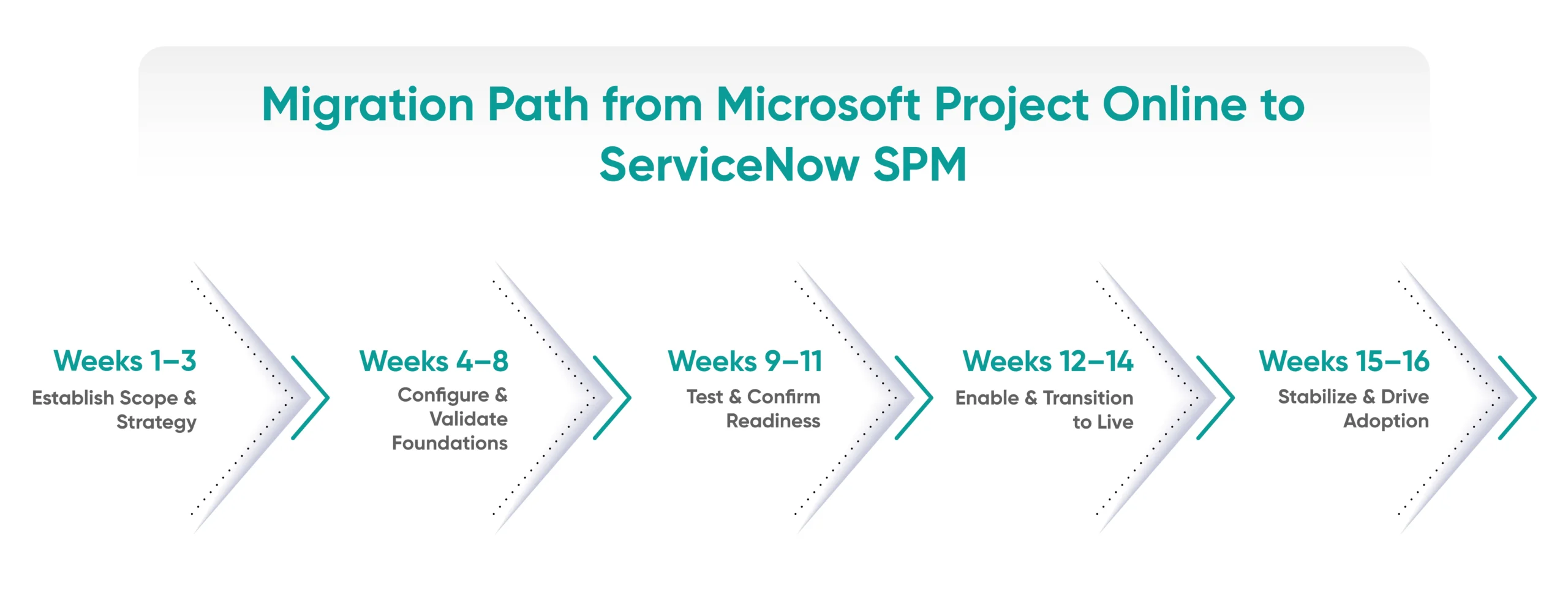 Phase 1: Establish Scope & Strategy (Weeks 1–3)
- Current-State Assessment: Build a complete view of your current Project Online landscape: identify active, inactive, and archived projects; review custom fields, reports, and lifecycle stages. Catalog all integrations (SharePoint, Power BI, Teams, etc.) and determine which projects should be migrated, archived, or retired altogether.
- Gap Analysis: Assess how Project Online compares with ServiceNow SPM across data structures, workflows, and features. This evaluation helps categorize what can be directly migrated, what needs adjustment, and what should be redesigned.
- Success Metrics Definition: Establish clear benchmarks for migration success such as migration coverage, system availability, or stakeholder validation timelines. Defining these early ensures alignment and helps control scope throughout the process.
- Migration Team Setup & Ownership: Form a cross-functional team including business stakeholders, IT experts, and ServiceNow specialists. Clearly define roles, responsibilities, and ownership for key activities such as validation, training, and post-migration support.
Phase 2: Configure & Validate Foundations (Weeks 4–8)
- Core Configuration: Set up foundational structures in ServiceNow, including WBS, project stages, stage gates, and approval workflows aligned to your operating model. Create standardized project templates and define portfolio/program hierarchies as needed.
- Field Mapping: Analyze how data structures differ between Project Online and ServiceNow SPM. Identify which fields align, which require transformation, and where gaps exist, especially for custom fields. Define data transformation rules early, including date formats, status values, and priority codes, and determine what to retain, modify, or discard.
- Integration Setup: Establish integrations with identity systems (SSO/Active Directory) and key enterprise platforms such as ERP or time-tracking tools. Validate user access, roles, and permission sync to avoid issues at go-live. For teams using third-party tools, platforms like Boomi, Mulesoft, Celigo, or ServiceNow’s native IntegrationHub are common choices.
- Pilot Migration: Run a controlled migration with a small set of representative projects (simple to complex). Validate tasks, dependencies, timelines, and resource allocations. Identify platform-specific behaviors that may impact scheduling or logic.
Phase 3: Test & Confirm Readiness (Weeks 9–11)
- User Acceptance Testing (UAT): Validate the system with real users. Have project teams execute end-to-end workflows: project creation, task assignment, status updates, and reporting—to ensure business processes function as expected.
- Data Integrity Checks: Perform structured validation by comparing migrated projects against source data. Verify key elements such as task details, timelines, dependencies, resource assignments, and baselines.
- Issue Resolution: Log and address all discrepancies identified during testing. Fix data mismatches, refine field mappings, and finalize any pending configuration decisions before moving forward.
- Cutover Planning: Define the go-live approach, including data freeze timelines, final migration window, and rollout schedule. Plan cutover during low-activity periods to minimize disruption. Consider a parallel operation period, running both systems briefly, if organizational risk is high.
Phase 4: Enable & Transition to Live (Weeks 12–14)
- Export from Project Online: Use Microsoft’s export APIs or OData feeds to extract project, task, resource, and timesheet data. PowerShell scripts or third-party tools can be used for bulk exports. Export attachments, documents, and linked SharePoint data separately.
- Load into ServiceNow in Dependency Order: Use ServiceNow’s Import Sets and Transform Maps for bulk data loading. Use the ServiceNow MID Server if migrating from on-premises environments. Load data in this sequence to respect system dependencies:
-
- Users & Resources
- Portfolios & Programs
- Projects (headers/metadata)
- Tasks & WBS
- Dependencies & relationships
- Timesheets & actuals
- Documents & attachments
- Role-Based Training: Deliver targeted training for project managers, team members, and stakeholders. Focus not just on functionality, but on key differences from Project Online and new capabilities in ServiceNow such as dashboards, automation, and enhanced visibility.
- Cutover Execution: Execute the finalized plan: complete final data migration, transition users to ServiceNow, and decommission Project Online to establish a single source of truth. Closely monitor the system during and immediately after go-live to quickly identify and resolve issues.
- Hypercare Support: Provide dedicated post-go-live support with IT and migration teams on standby. Set up clear support channels (e.g., ticketing queue or chat) to capture issues, respond quickly, and ensure a smooth user experience during initial adoption.
Phase 5: Stabilize & Drive Adoption (Weeks 15–16)
- Post-Go-Live Support: Provide ongoing support to resolve issues and assist users. Track recurring challenges to identify gaps in configuration, training, or usability.
- Iterate & Refine: Leverage early usage insights to optimize workflows, access controls, and system configurations. Enhance the setup by building or refining dashboards and reports based on real data.
- Measure Adoption: Evaluate success against defined metrics: data accuracy, project performance, and user adoption. Identify and address any remaining gaps to ensure long-term effectiveness.
Plan your migration with confidence
What Can Be Migrated to ServiceNow SPM
Not all data and processes should be migrated in the same way. A structured approach ensures each element is handled based on its business value and future relevance.
1. Retain as Is (Lift and Preserve)
- Active project metadata
- Key custom fields
- Attachments, descriptions, milestones, and critical notes
Approach: Migrate these elements with minimal changes to preserve continuity. Note that only standard mapped fields are transferred by default; any additional custom fields may need to be recreated during configuration.
2. Transform & Standardize
- Resource plans and team assignments
- Cost and baseline data
- Project templates
Approach: Restructure and clean data to align with ServiceNow’s model. This may include consolidating duplicate resources, updating team structures, and standardizing templates to improve reporting accuracy and planning efficiency.
3. Rebuild & Modernize
- Dashboards
- Approval workflows
- Status reporting and notifications
Approach: Recreate these using ServiceNow’s native capabilities rather than replicating legacy setups. Replace manual processes with automated workflows and leverage advanced features like real-time dashboards for better visibility and scalability.
Even with a structured approach, certain risks can impact migration success. Addressing them proactively ensures a smoother transition.
Common Migration Risks & Best Practices
- Data Loss Risk: Ensure data accuracy at every stage through systematic validation. Maintain secure backups (e.g., Project Online exports) and use reconciliation checks to confirm complete and accurate data transfer. Define rollback mechanisms in advance to restore data if critical issues arise.
- Operational Disruption: Minimize impact by adopting a phased or business unit–wise migration approach. Leverage pilot runs to identify issues early and schedule cutover during low-activity periods.
- User Adoption: Drive adoption through proactive change management. Keep stakeholders informed, highlight key benefits, and provide hands-on support. Early wins such as quick-access reports or dashboards help build confidence.
- Validation Discipline: Use structured checklists to ensure completeness. Validate key elements such as dependencies, assignments, and naming conventions to avoid gaps post-migration.
- Security & Access Risks: Ensure proper role-based access controls are defined and validated in ServiceNow. Misaligned permissions can lead to data exposure or access issues post-migration.
- Timeline & Contingency Planning: Account for potential delays by building buffer time into your plan. Allocate contingency resources and plan for iterative improvements post go-live.
Execute the Transition with Confidence with Aelum
A successful migration is defined by how smoothly operations continue, and how confidently the organization moves forward without disruption. When executed with the right structure and focus, it becomes an opportunity to strengthen control, standardize processes, and enable more connected, enterprise-wide execution.
This is where the right guidance makes a difference.
As an AI-first ServiceNow partner, Aelum enables organizations to design and execute migration pathways aligned to business priorities, ensuring continuity, minimizing risk, and driving long-term value.
If you’re planning your next step, we can help you navigate the transition smoothly and with confidence, get in touch to get started.
Build your migration roadmap with Aelum