ServiceNow has a new answer to AI that talks back: ServiceNow Otto, an enterprise AI assistant that responds to requests, routes, executes, and closes them across departments and systems.
Most businesses already have AI everywhere: a copilot in the ticketing tool, a chatbot, and a summarizer inside the CRM. Each one works well on its own, but none of them talk to each other, nor can see past the system they live in. So, employees still do what they did five years ago: switching tabs, chasing approvals, and repeating themselves to every tool that doesn’t remember the last conversation. That’s the gap ServiceNow built Otto to close: one layer that finishes a request instead of just answering it.
Meet ServiceNow Otto
ServiceNow Otto is the unified AI experience ServiceNow introduced at Knowledge 2026, one front door for employees, customers, and support teams to ask for what they need, in plain language, without knowing which system or department owns the request.
Otto brings together three things ServiceNow already had in separate corners of its portfolio:
- Now Assist is its generative AI layer, embedded inside ServiceNow workflows.
- Moveworks is the employee AI experience company ServiceNow acquired in 2025.
- AI Experience is the conversational framework ServiceNow previewed the year before.
Under Otto, they become one governed, conversational layer that sits above the platform rather than inside a single module.
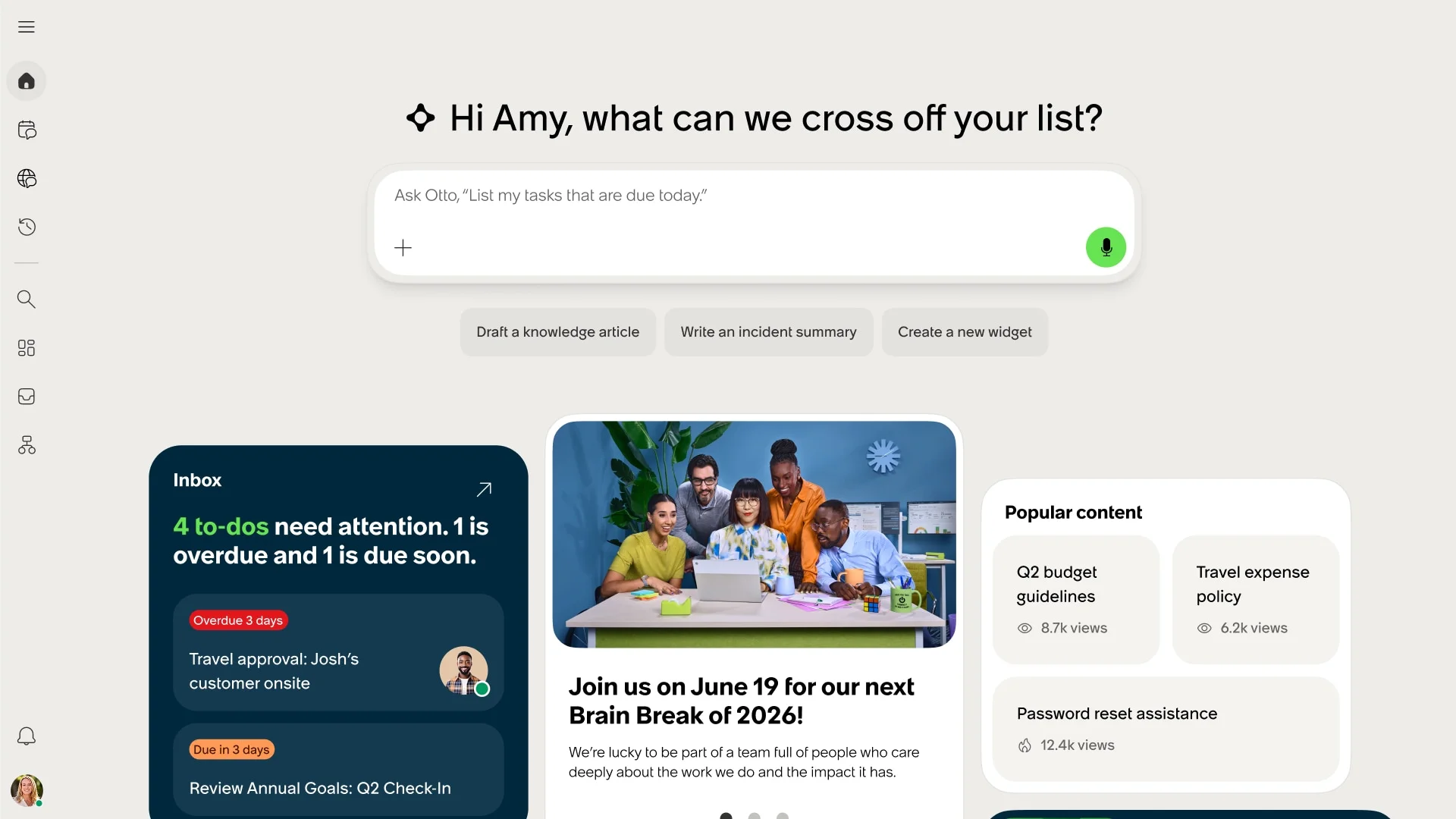
ServiceNow Otto dashboard showing an AI-powered workspace where employees can manage tasks, review inbox priorities, access popular knowledge content, and initiate actions through a conversational assistant.
How is Otto Different from Now Assist & EmployeeWorks?
Now Assist and EmployeeWorks exist, and they’re the engine inside Otto, not separate products you choose between.
Now Assist lives inside ServiceNow workflows, it summarizes cases, drafts content, and suggests next steps, but only within the module it’s installed in. EmployeeWorks gives employees one chat interface to ask IT or HR questions, useful but limited to the systems it’s integrated with.
ServiceNow Otto sits above both. It decides which tool or agent should handle a request, executes the task itself, and governs every action through AI Control Tower, something neither Now Assist nor EmployeeWorks does on its own.
How ServiceNow Otto Gets Work Done
Most enterprise AI assistants stop at the answer. Otto is built to go four steps further, and it follows the same sequence every time someone makes a request.
- Understands intent: Otto does not need a form, a category, or the “right” keywords. An employee can type, speak, or even enter half a sentence in frustration, and Otto’s natural language layer works out what’s being asked, regardless of which app or channel it came through.
- Decides who should own it: Once the intent is clear, Otto figures out whether the request belongs to an AI agent, an automated workflow, or a human in the loop, and routes it there.
- Executes using your background: This is the part most enterprise AI assistants skip. Otto acts using the company’s actual data, approval chains, org structure, and policies, rather than generic logic. That’s what lets it fill a form, trigger an approval, and follow it through to closure, instead of just describing the steps to someone.
- Remembers and stays governed: History carries across the conversation, even if the employee switches channels or comes back hours later. And every action Otto takes, what it accessed, what it decided, what it did gets logged by ServiceNow’s AI Control Tower, giving organizations a full audit trail and an explanation for every outcome.
ServiceNow Otto Core Capabilities
Once you know how ServiceNow Otto thinks, the next question is where you use it. The answer is four capabilities, each suited to a different kind of request:
Conversational AI
Ask for what you need in plain language, and skip the portal entirely. An employee asking to update their tax declaration or request leave doesn’t need to find the right form in the right system; they just ask, and Otto resolves it end-to-end.
Enterprise Search
Otto searches across documents, wikis, internal databases, and even SharePoint, and instead of returning a list of links, it gives one answer, personalized to the person’s role, location, and department. A new hire asking about expense reimbursement limits in their region gets that exact answer.
AI Voice Agents
Requests can be handled entirely through natural voice conversations, in multiple languages, with no IVR menus or hold queues. A customer calling support in Spanish and an employee calling IT in Japanese can both have a natural conversation.
AI Data Explorer
Business users can query enterprise data directly in plain language instead of waiting for a report. A regional manager asking “what’s our average ticket resolution time this month versus last” gets an answer and the analysis behind it, without filing a request to the analytics team.
Where Can You Use ServiceNow Otto Today?
Otto is not fully rolled out yet, so this is exactly where it stands right now:
It’s live inside two places: ServiceNow EmployeeWorks, the conversational employee portal ServiceNow launched in early 2026, and AI Control Tower. ServiceNow has committed to extending Otto across the rest of its products over the coming year, so most customers will see it arrive gradually rather than all at once.
One signal is hard to ignore: In EmployeeWorks’ first month, ServiceNow closed six deals worth more than $1 million each in net-new annual contract value. This proves businesses are willing to bet big on it before the rollout is even complete.
Benefits of ServiceNow Otto
The mechanics matter, but what really justifies adopting Otto is what changes at the business level once it’s running. Let’s see what that looks like:
- Lower total cost of ownership: Instead of licensing and maintaining several disconnected AI tools, each with its own integration overhead, IT consolidates spend and engineering effort into a single layer.
- Faster onboarding for new use cases. Extending Otto to a new department doesn’t mean building a new bot from scratch. It plugs into the layer that already exists.
- Higher adoption, less training: Employees learn one way to ask for things, instead of memorizing which portal or chatbot handles what.
- Less shadow IT: When the official channel really resolves a request, employees stop working around it: fewer side-channel emails, fewer personal tools filling the gap.
- One audit trail: Compliance teams aren’t piecing together logs from five separate tools during a review; everything Otto touches sits in one place.
A Day in the Life with ServiceNow Otto
The clearest way to understand ServiceNow Otto isn’t another definition; it’s watching it work. Let’s have a look at two scenarios: one internal, one customer-facing.
Inside the enterprise: onboarding across departments
A hiring manager tells Otto a new employee is starting next month, in a given role, at a given location. Otto identifies the right workflows across HR, IT, and Facilities, and executes within each system’s existing rules: account provisioning in IT, badge and desk allocation in Facilities, and benefits enrolment in HR. If the manager checks back days later, asking about the laptop, Otto picks up the same thread. Every step is logged through AI Control Tower, ready for the next compliance review.
Outside the enterprise: a customer issue, resolved end-to-end
A customer calls about a delayed shipment and a charge they don’t recognize. Instead of being passed between a phone tree, billing, and logistics, Otto pulls the order status from the fulfillment system, checks the charge against account history, and either issues a credit within policy or escalates to a human agent. Either way, the full history travels with the request, so the customer never repeats themselves.
Plan Your ServiceNow Otto Rollout with Aelum
ServiceNow Otto is rolling out gradually, which means most companies won’t get to opt out of the decision, only choose how ready they are when it arrives. Businesses that get the most out of Otto will be the ones who’ve already audited their AI footprint and cleaned up governance before launch.
As a ServiceNow boutique partner, Aelum already does this kind of ground work for clients running Now Assist, AI Agents, and Virtual Agent today. And that’s where we fit in for you: auditing your current AI setup, and making sure your ServiceNow environment and AI Control Tower are ready to absorb Otto when it reaches your instance.
Talk to our ServiceNow AI experts about preparing your environment for Otto.