GraphQL API Framework is a new feature added as a part of Now Platform Paris release.
It is a query language and runtime for Application Programming Interfaces (APIs) that prioritizes giving clients exactly the data they request and no more. GraphQL is designed to make APIs fast, flexible, and developer-friendly. It can even be deployed within an Integrated Development Environment (IDE) known as GraphQL.
It is a query language for APIs and a runtime for fulfilling those queries with your existing data.
GraphQL provides a complete and understandable description of the data in your API, gives clients the power to ask for exactly what they need and nothing more, makes it easier to evolve APIs over time, and enables powerful developer tools.
Let’s consider our requirement is to get the details of an incident record along with the details of the problem record related to that incident, based on its number.
| schema { query: Query } type Query { type Incident { |
Using the above schema we are gonna query the Incident record as well the Problem record which is related to the incident.
Name: Incident Resolver
| (function process(/*ResolverEnvironment*/ env) { var incidentGr = new GlideRecord(‘incident’); if (env.getArguments().id != null) incidentGr.addQuery(‘number’, env.getArguments().id); incidentGr.query(); return incidentGr; })(env); |
Name: Problem Resolver
| (function process(/*ResolverEnvironment*/ env) { var probId=env.getSource().problem_id.value; var problemGr=new GlideRecord(‘problem’); problemGr.get(probId); return problemGr; })(env); |
Find the Resolver Mapping related list in the schema record and Map the resolvers to fields in the schema. This mapping lets the system know what value to return when a component queries a specific field.
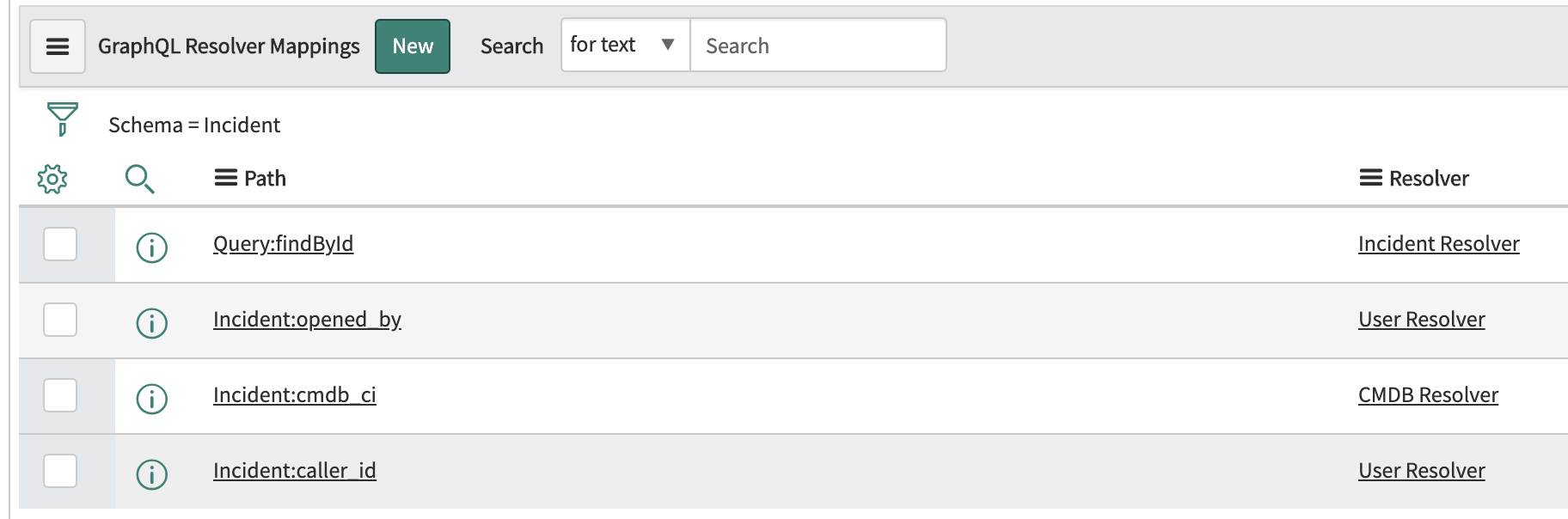
Now everything is set from the Servicenow Side. We have successfully created the GraphQL API to find the specific incident and its details
In Postman use the following configuration
End Point : https://<instance>.service-now.com/api/now/graphql
Method : POST
Request Body Type : GraphQL
In The Request body Query Section add the following data:
Now Execute the query
You will get the response as follows :
Thoughts?
We would love to hear your team’s best practices and learnings in GraphQL.
This is a topic that is important to build long-lived GraphQL APIs.

Remember Windows XP? Reliable, familiar, and so deeply embedded in…

You went live on ServiceNow. Your team celebrated, your stakeholders…
Migrating from Microsoft Project Online to ServiceNow starts with one…