Most plants know they’re producing less than they could. Very few can say exactly where the time and yield are going.
The data exists. It’s sitting in PLCs, spreadsheets, clipboards and end-of-shift reports. By the time anyone pulls it together, the shift is over and the problem has already cost you output.
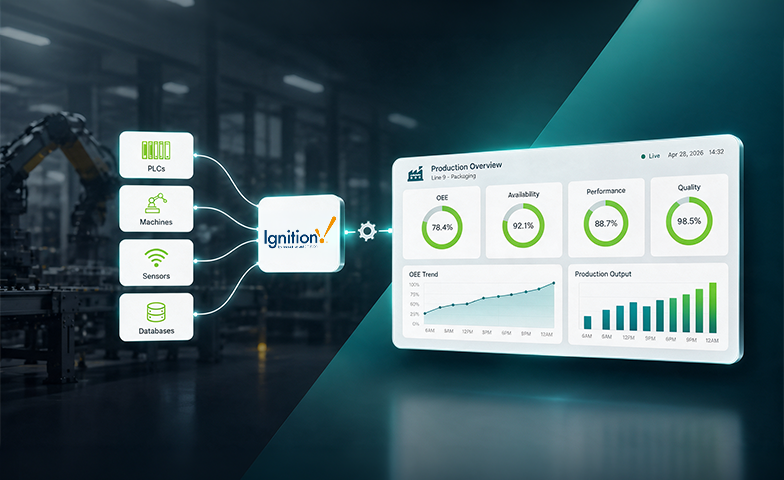
Overall Equipment Effectiveness (OEE) fixes the visibility problem. It rolls availability, performance and quality into one number that shows how much of your planned production time is truly productive. But OEE only changes outcomes when the right people see it while there’s still time to act. That’s where a real-time OEE dashboard comes in.
In this guide, we’ll cover why manufacturers need an OEE dashboard, how OEE in improving machine availability and minimizing losses, OEE enables higher productivity and better utilization of manufacturing assets
Why Businesses Need an OEE Dashboard
A spreadsheet can calculate OEE. It can’t put that number in front of an operator at 10:15 a.m., when a machine has been running slow for forty minutes. Visibility has to be live, or it’s just reporting.
Here’s what manufacturers typically struggle with without it.
Production challenges
- Unplanned downtime with no clear cause: Machines stop, someone restarts them, and the reason never gets recorded.
- Micro-stops and slow cycles: Short stoppages and reduced speeds hide inside “running” time, so nobody counts them as losses.
- Slow changeovers and startups: Minutes lost at every product switch add up across a week.
- Manual data collection: Paper logs and end-of-shift entries are late, inconsistent and easy to get wrong.
- No common yardstick: Different lines, and especially different plants, measure performance in different ways, so you can’t compare them fairly.
Quality challenges
- Scrap and rework found too late. By the time a defect shows up at final inspection, you’ve already made a lot more of it.
- Defects not tied to a source. Without data by machine, shift and product, root-cause analysis turns into guesswork.
- Weak traceability. It’s hard to connect process conditions to quality outcomes when the data lives in separate systems.
- Reactive checks. Quality teams respond to problems instead of getting early warnings.
What it costs the business
These aren’t just operational annoyances. Hidden losses mean hidden capacity, which often leads to buying equipment you may not need. They also show up as overtime, missed delivery dates and a higher cost per unit.
And when reporting runs a day behind, decisions do too.
How OEE Helps Overcome These Challenges
OEE works because it splits one vague problem (“we’re not hitting our numbers”) into three specific ones you can act on.
OEE = Availability X Performance X Quality
-
- Availability captures stop: It shows how much of your planned time the machine ran, and which downtime reasons took the most.
- Performance captures speed: It exposes slow cycles and micro-stops that hide inside run time.
- Quality captures yield: It shows how many units were good the first time, and where scrap starts.
Behind these three sit the classic “six big losses”: breakdowns, setup and adjustments, minor stops, reduced speed, startup rejects and production rejects. They give operations, maintenance and quality teams a shared language for what to fix first.
From end-of-shift reports to in-shift response
The real value comes from timing. When availability dips, a supervisor sees it and sends maintenance now, not tomorrow. When quality slips, the line gets checked before another few hundred units go out the door.
A common definition also lets you compare lines and plants on equal terms. That makes it easier to decide where to invest and which practices are worth copying.
That said, the number is only as good as its definition. Agree on how you treat planned downtime, ideal cycle times and what counts as a good unit before you roll anything out.

Why Ignition for OEE
You can build an OEE dashboard on many platforms. Ignition is a strong choice because most of it’s open, scalable, and vendor-agnostic platform makes it a powerful differentiator for developing modern OEE applications that deliver real-time operational insights and improved manufacturing productivity.
1. Unified Platform for industrial connectivity, visualization & reporting
Ignition handles device connectivity, tags, historian, alarming, scripting and visualization together. That means fewer integrations to maintain and fewer places for data to get lost between the machine and the screen.
2. Seamless Connectivity Across Diverse PLC Ecosystems
Plants rarely run one brand of equipment. Ignition connects through open standards like OPC UA, Profinet, Modbus TCP/IP,MQTT so you can pull data from mixed PLCs and machines into a single OEE model without being locked into one vendor’s ecosystem.
3. Licensing that suits growth
Ignition uses server-based licensing with unlimited tags and clients. Adding another line, screen or user doesn’t push your software cost up the same way it can with per-tag or per-client models. That matters when you want to go from a pilot line to a whole site.
4. Template-Driven Development for Rapid Scale
User-defined types (UDTs) and templates let you define a machine’s OEE data model once and reuse it across lines and plants. It’s what keeps definitions consistent as you scale, which is the whole point of OEE at enterprise level.
5. Dashboards that go where people are
Ignition Perspective delivers web-based screens that work on control-room displays, tablets and phones. Operators, supervisors and plant managers can all see the same live data, each with a view built for their role.
6. Fits the rest of your stack
Ignition connects to SQL databases, ERP and MES systems, and cloud analytics platforms, so OEE data doesn’t have to stay trapped on the shop floor. You can also build your OEE logic yourself or use packaged OEE functionality depending on how much customization you need.
Designing an Effective OEE Dashboard
A good OEE dashboard answers three questions briefly: how are we doing, what’s holding us back, and what should we do next. Everything else is decoration.
1. Design for the role
An operator needs to know what’s happening on their line right now. A plant manager wants trends across lines and shifts. An executive cares about performance across sites. One screen rarely serves all three, so build role-based views from the same underlying data.
2. Keep it simple, and use color sparingly
A few high-value visuals beat a crowded screen. Follow high-performance HMI principles: a muted, neutral base, with color reserved for abnormal conditions. If everything on the screen is bright, nothing stands out when something goes wrong.
The essential components
- Live OEE gauge with the availability, performance and quality breakdown
- Machine state and shift timeline showing when the line ran, stopped or slowed
- Downtime Pareto by reason code, so the biggest losses are obvious
- Production vs. target covering counts, rate, and good vs. rejected units
- Trends by shift, day and week
- Alerts and thresholds for extended downtime, slow running and quality drops
3. Make it actionable
A dashboard that people only look at doesn’t change anything. A few design choices make the difference:
Fast reason-code capture: Automatic state detection tells you a machine stopped, but not why. Give operators a quick way to log the reason in seconds, not minutes.
Drill-down: Let users move from plant to line to machine without switching tools.
Handover summaries: Automated shift reports keep context from getting lost between crews.
A review routine: Tie the dashboard to a daily meeting with clear owners. Without that, it becomes wallpaper.
4. Get the data foundation right
Polish matters less than trust. If a counter is unreliable or machine states aren’t validated, operators will spot the errors quickly and stop believing the numbers. Start with solid data and one agreed OEE definition, then make it look good.
Scale OEE in Ignition with Aelum
A better OEE setup isn’t about more charts or a shinier gauge. It’s about giving the right people the right number at the right moment, with a clear path to act on it.
Start small with a well-defined OEE pilot, validate data integrity and business value, then scale efficiently through a template-driven architecture that enables consistent deployment across the enterprise.
Planning an OEE solution in Ignition or struggling to drive adoption of existing dashboards? Our experts can help assess your current state, identify hidden inefficiencies, and focus on the improvements that will deliver the fastest business value.